Finding the right yearbook resource should be simple — whether you are planning your ladder, training a new staff member, troubleshooting Yearbook 360 or looking for inspiration before the next deadline.
That’s the idea behind the redesigned Yearbook Help website, which Walsworth has updated in time for the 2026-27 school year to make support resources easier to find and easier to use. Built off feedback from customer schools, advisers and staffs, the new Yearbook Help creates a more consistent experience between Yearbook Help and walsworthyearbooks.com, helping users move between the two sites with ease and fewer clicks.
Easier navigation, better organization
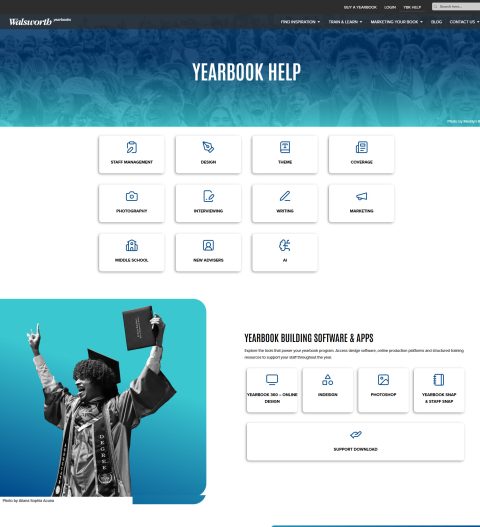
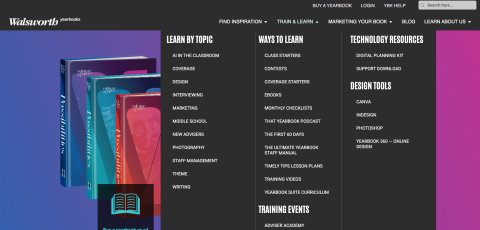
The updated site more closely matches the look and feel of walsworthyearbooks.com, with consistent navigation, expanded menus and an improved search experience that covers both websites. That means yearbook staffs can more easily discover the resources they need — whether they start on Yearbook Help, walsworthyearbooks.com or inside Yearbook 360.
Both Yearbook Help and walsworthyearbooks.com now include improved homepage and topic page organization, with new topic-focused “hub pages” designed to bring related resources together in one place.
These hubs are intended to help users learn by topic, with areas such as theme, design, marketing, writing and photography highlighted.
The benefit is straightforward: instead of hunting through separate pages or wondering where a resource lives, the redesigned structure is meant to create clearer paths to Walsworth’s library of training videos, class starters, Yearbook Suite curriculum, digital editions and other key resources.
 A smoother connection
The new Yearbook Help site has also been designed to work more smoothly with walsworthyearbooks.com. The two sites are now optimized with the same navigation experience, and a new direct “YBK Help” link has been added to the main navigation on walsworthyearbooks.com.
The primary way most customers access Yearbook Help has not changed. When users are logged in to Yearbook 360 or working in Online Design, they can still access Yearbook Help by clicking the “?” icon. Customers will also continue using their Yearbook 360 credentials to log in to Yearbook Help.
For visitors moving back and forth between public resources on walsworthyearbooks.com (such as Cover Gallery or Theme Gallery) and customer-only resources on Yearbook Help, the new experience is intended to feel more connected. Hub pages now provide clearer signals about which resources are public and which require Yearbook Help access. Cues such as lock icons and grayed-out images will appear on selected pieces of content to indicate they are exclusive to Yearbook Help, and only available to customers.
Search across both sites
A new search experience is designed to cover both Yearbook Help and walsworthyearbooks.com, making it easier for users to find the support content, educational materials and resources they need from one place.
When a search result is available only to Walsworth customers through Yearbook Help, users will see the visual cues such as locked or grayed-out content, along with messaging that explains access requirements. This helps customers understand when they need to log in and helps non-customers understand that some Help resources are exclusive to Walsworth schools.
A stronger Online Design support experience
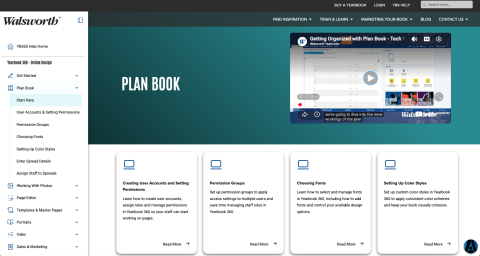 The Online Design section of Yearbook Help has also been refreshed with improved navigation. The updated section includes a sidebar-style navigation system, topic-specific pages and access to resources such as digital editions, handouts, support numbers and downloadable materials.
For logged-in users, the updated Online Design area now displays personalized contact information, including details for a user’s yearbook rep, customer service representative and computer support contact.
Helping advisers and staffs get back to creating
Yearbook staffs have enough to manage: deadlines, coverage, photography, design, sales, marketing, storytelling and everything else that goes into creating a book. The redesigned Yearbook Help site is meant to make support easier to access, so advisers and staffs can spend less time searching and more time creating.
With improved navigation, clearer topic pages, expanded search, better cross-site movement and continued access through Yearbook 360, the new Yearbook Help experience gives Walsworth schools a stronger support hub heading into the school year.