One of the most overlooked aspects of photography is lighting. Studio lighting serves as the great equalizer within our yearbook photography, which helps us produce more consistent images throughout the book as well as across individual spreads.
We use studio lighting specifically for secondary coverage – and sometimes our portraits when we’re highlighting individual students and staff – because we find that it really elevates the quality of cutouts and images.
Modular secondary coverage organizes your content into fun and easy-to-consume packages. Our mods use cutout photos to be more visually engaging and tell students’ stories in a more personal way.
Before locking down our studio setup, we noticed we often had spreads we loved, but the images in our mods brought down the overall quality of the spread. The sports photography would be amazing, but dark or low-quality cutouts felt out of place on the spread and distracting.
Studio lighting allows you to maintain a unified look across your secondary coverage. Additionally, it helps avoid cutouts having different lighting, backgrounds, focal lengths and angles. Adobe® Photoshop® or other photo-editing software speeds up the cutout process.
Step into the world of studio lighting with this breakdown of what you’ll need and how our staff uses flash photography to create fun and visually appealing modular coverage.
“we are capturing light, not images”
Photo Equipment We Use
External Flash Head Units (often called a speedlight or strobe): Only one flash unit is needed to start, but most setups utilize two. Place your main flash to illuminate the majority of your subject, directly in front or slightly offset to either side. If you have a second flash unit, you can use it to light your background, separating out your subject for smoother cutouts.
- Flash Modifier Boxes: Direct flashes create harsh light. There are various softboxes and shapes that cover your flashes to diffuse light and create soft, controlled lighting. Without these modifiers, your flash will give you the ’90s and 2000s point-and-shoot harsh illumination from everyone’s favorite blunder years.
- Wireless Remote Trigger: Keep it simple. Make sure it matches your camera or flash brand so all your equipment will communicate with each other. You may also need a receiver or cord depending on your setup.
- Background: This could be a roll of photo paper, a fabric sheet or a V-Flat, which we use. You can purchase one or make your own to save money.
- Stands: Two or more depending on your setup for the flashes as well as a backdrop and possibly even a tripod for the camera.
- Reflector: A simple circular reflector will help fill harsh shadows.
SETUP: Creating Consistent Lighting
When teaching students, I always emphasize we are capturing light, not images. When using multiple cutouts for modular or showstopper spreads, uniform lighting creates a more cohesive visual effect. Studio lighting gives you the most control, but many staffs can start with a consistent location and still see major improvements in quality.
Set up your backdrop first. The most common are black, white, green or blue. Our classroom tried all of them and settled on a double sided V-Flat of black/white. The issue we had with green and blue was certain color would cast on the cutouts.
If you want to get started without a pro setup, look for a space that has:
- Even light; diffused window works well
- A simple background with solid-colored and textured walls; avoid brick
- Light-colored surfaces nearby; note that concrete, walls or pavement can reflect light back onto your subject
Avoid:
- Direct sunlight; creates harsh shadows
- Mixed lighting; can cause color issues
- Photographing in different locations every time
Remember, start small. Capturing light doesn’t always mean you need to spend large amounts of money. We accumulated our equipment one piece at a time over many years. Even if your first setup doesn’t match the “ideal,” it still produces stronger, more consistent results than taking pictures of students in random spots across campus.
DIRECT: Pose Based on Page Layout
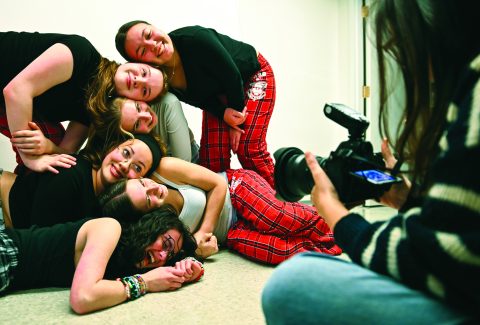
Pose your subject within the context of your yearbook. Never assume your subject knows what you want. Most students get nervous when photographed and need support to get a good photo. Making the environment fun and lively can help them feel comfortable to take the photo.
Keep in mind:
- Will your subjects weave around typography, lean against or sit on enlarged product photography, etc.? Prompt students to lean against a wall or sit in a chair that you will cut out.
- What colors will the mod be? What color is your subject wearing? You don’t want them to blend in.
- If multiple students are included in the same modular package but they take their photos separately, plan out how/if they will interact with each other. Have them angle slightly to opposite sides so they will face each other on the page.
- Will students need to bring props or outfits for their photo? How will you communicate this to them?
As the photographer, you want to direct your subject’s pose because you know if their arms and hands will be visible, what background their hair will be on and how much of their clothing will show.
SHOOT: Flash and Camera Settings
Flash settings:
Your flash head settings will depend on your room lighting, whether or not you have an overhead fluorescent light to use and other factors. Experiment with your equipment and settings.
While teaching students how “stops” of exposure work is important, start by making sure they know to increase the flash power incrementally on the flash unit or remote, until the subject is properly lit for your purpose.
Camera settings:
- Shutter speed: 1/250 to sync with most flashes. Because your subject stands still, no need to worry about motion blur.
- Aperture: Close down to at least f/5.6 to keep subjects sharp. Keep your subject in focus from head to toe. You don’t need to worry about the background being in focus because it will be cut out. For portraiture, you may want to play around with having your subject more or less in focus.
- ISO: Your ISO should be at base, which for most cameras is 200 ISO. Any light you would need to expose your subject comes from the flash units. Don’t introduce noise into your photo when you control the light. Keep it as low as you can.
EDIT: Cutouts and Editing
We use Adobe Photoshop because it is the professional standard and comes included in our site license. Photoshop makes it extremely easy to cut out photos due to improved AI algorithms, and if you have high contrast backgrounds as we discussed, it really works well.
Do not despair if your program does not have access to Photoshop. At this point in time, the AI revolution has resulted in easy access to cutouts such as: your publisher’s design platform, Canva, free Adobe products, photo editing sites and even native apps on your Apple or Android phones.
Spread Walkthrough
Like most schools, we saw a craze for anything squishable this past fall. The king of this craze was the almighty NeeDoh. In our yearbook classroom alone, we had roughly eight NeeDohs floating around the room on any given day.
The photos and cutouts we produced using studio lighting brought this spread to life because it allowed us to showcase our students interacting with their NeeDohs.
Studio lighting really brightens up your book because it allows you to put students where you maybe wouldn’t otherwise. When I first started, we might have built this spread with stats, a graph, quotes, possibly even a drawing if we had an artist. But because we learned the ability to control light, we could take high-quality photos of the students and their own personal NeeDohs.
Without these cutouts, the spread wouldn’t reflect the essence of why we covered the topic in the first place. These squishable toys are fun, silly, colorful and always bring out joy when students pass them around and squeeze them. We want to see that same joy in the poses and interactions of the students with the object photography.
This is what brings the spread to life. When you find a consistent setup – low- or high-budget – it opens the door for better storytelling. Your staff can move beyond basic coverage so you can confidently execute your most creative ideas.
If you love yearbook, then you’ll love the full issue of Idea File magazine, available at walsworthyearbooks.com/ideafile. And if you’re interested in finding out more ways Walsworth can help you create a smoother, easier yearbook experience, reach out to your local Walsworth rep.